Mori Sprite Studio
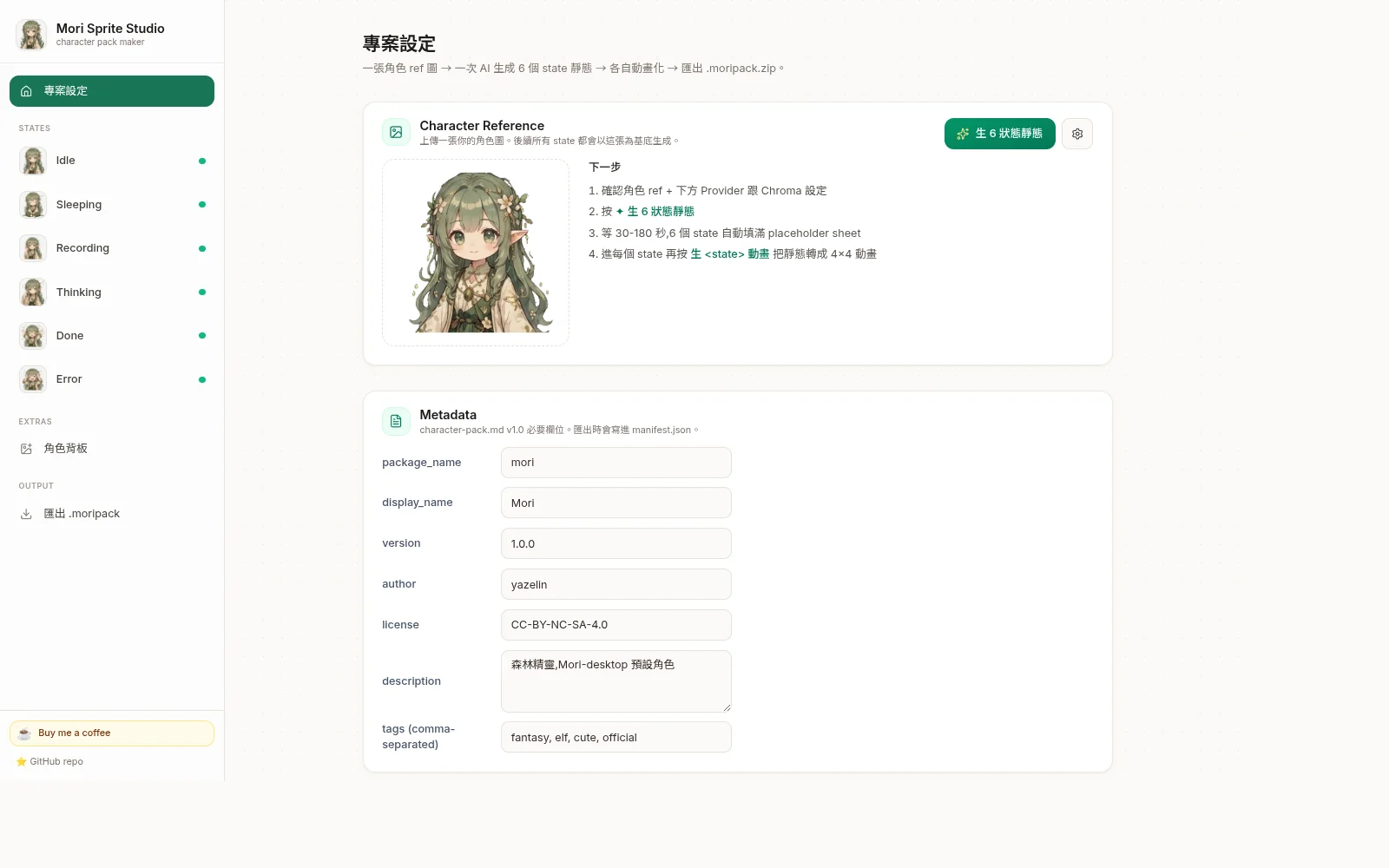
Web tool to build 1024×1024 4×4 sprite animation packs from a single character reference image. AI-powered. Browser-only. Transparent backgrounds. Multiple export formats.
↑ Live sprite-sheet animation playing via CSS steps() — same technique mori-desktop uses
What it does
You give it one reference image of your character. It produces a complete sprite animation pack — 6 required + 2 optional states, each a 1024×1024 4×4 sprite sheet. Export a .moripack.zip for the standalone Mori Pet Player or for mori-desktop.
- Required (6): idle / sleeping / recording / thinking / done / error
- Optional (2): walking / dragging (cyclic locomotion — uses a separate W/Dr pipeline)
It's built for Mori — yazelin's woodland AI companion. "Iron Man 有 Jarvis,我有 Mori。" This studio creates Mori's visible sprite form. Use Mori Pet Player when you want a simple desktop pet, or mori-desktop when you want the full AI companion.
The studio also works for any character you want to give a visible form to: your own AI partner / personal spirit / streamer overlay companion / character mascot. The Mori demo is one example of what's possible.
You can also export each state as APNG, GIF, WebM, or just the raw sheet PNG — useful for LINE animated stickers, Discord, OBS overlays, video editing, etc.
Ways to use Mori
Mori Pet Player — standalone desktop pet
Import a .moripack.zip and let Mori wander, rest, and sleep on your desktop; you can also pick her up and move her. Portable builds are available for Linux, macOS, and Windows. The Player only displays and animates the character — it does not include chat, an AI assistant, or image/music generation.
Download the portable Player · Source repo
Download Mori Desktop — the full desktop AI Agent for executing tasks, with providers such as Claude and Codex CLI.
Live Demo — chat, images, and music
Open Output → Live Demo in the Studio. Connect a Gemini-Web service you run by entering its Base URL and API key. Mori can chat, answer news and weather questions, and generate images and music in the browser. For image and music generation, your service must allow CORS requests from mori-sprite-studio.vercel.app. This is separate from Mori Pet Player.
Workflow
- Upload character ref — any PNG/JPG of your character.
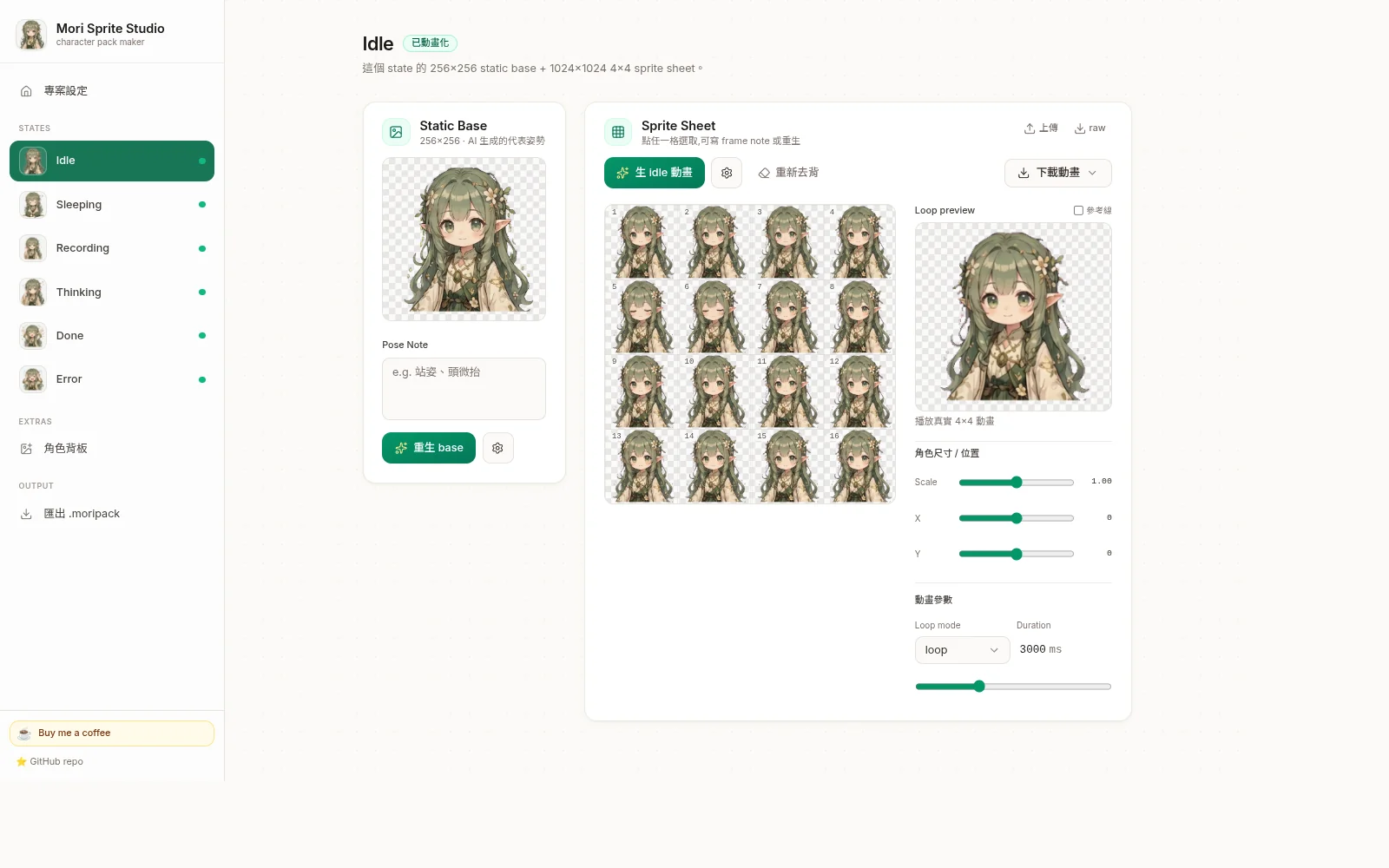
- Generate 6 statics — one AI call produces a 3×2 grid the tool splits into 6 state poses.
- Per-state animation (required 6) — pre-tiled placeholder + multi-anchor identity reference keeps the character locked with subtle motion.
- Optional walking + dragging — separate W/Dr pipeline (no pre-tile, since gait cycles need free per-frame design). Reverse + swap buttons let you hand-sort cells until the walk looks right.
- Fine-tune — per-cell regen, loop config, cross-state normalize, scale/offset sliders.
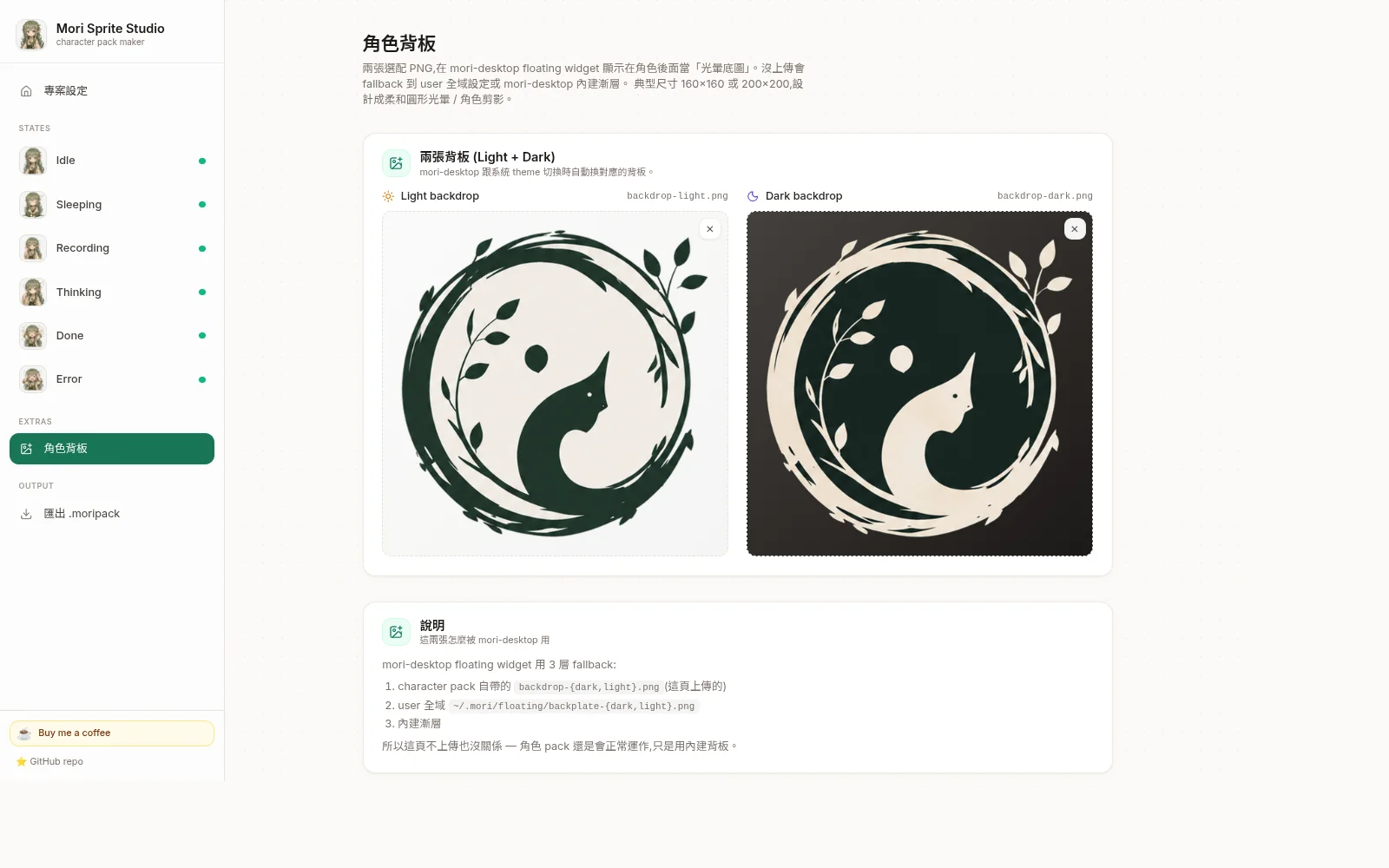
- Backdrop (optional) — Light + Dark backdrop PNGs. Use 桌面預覽 view to see all states layered on backdrop with shape + theme toggles.
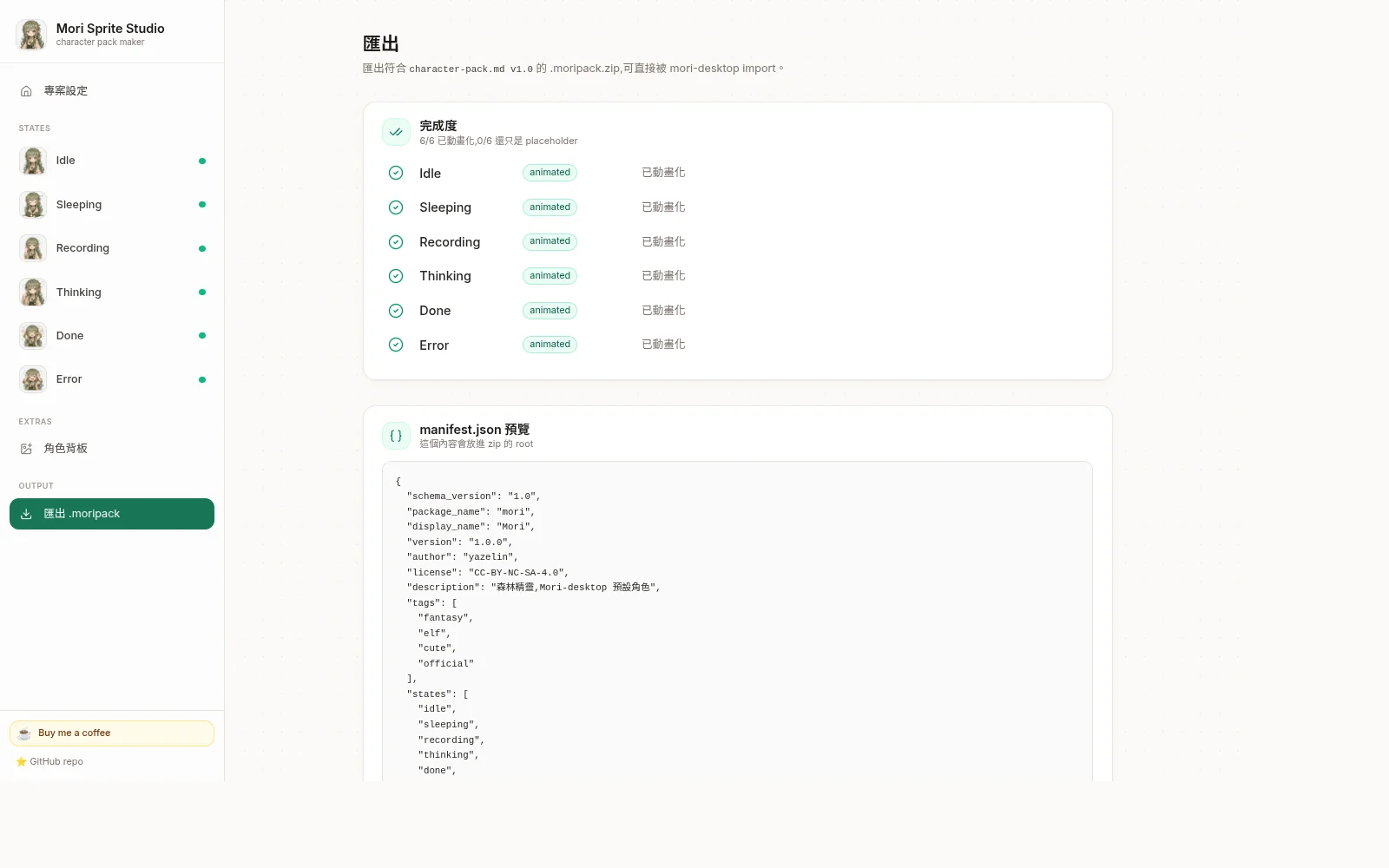
- Export
.moripack.zipfor Mori Pet Player or mori-desktop, or individual APNG / GIF / WebM for other platforms.
Features
3 AI providers (BYOK)
Google Gemini Direct (AI Studio key), Codex-Image (ChatGPT Plus quota), Vertex Gemini — all bring-your-own-key.
Anti-jitter
Pre-tiled placeholder sheet as AI reference locks character position across all 16 frames.
Anti-character-drift
Multi-anchor identity reference sends every other state's static so outfit/hair stays consistent.
Walking + Dragging pipeline
Dedicated W/Dr standalone path. AI designs all 16 cells freely from character ref + neutral standing static. Cell-by-cell gait structure baked into template.
↺ Reverse cells
One-click reverse all 16 cells. Rescues sheets that play in reverse direction.
✥ Swap mode
Click cell A → click cell B → swap contents. Hand-tune the gait order until walking looks right.
Desktop preview view
All 8 states laid out as floating widgets with shape (circle/rounded/square) × backplate (logo/plain) × app theme × OS theme toggles. Matches mori-desktop's render 1:1.
Anatomy-agnostic prompts
Works for humanoid / plant / robot / blob / gem. Semantics describe motion abstractly.
One-shot patterns
BURST-AND-SETTLE for celebrations vs SUSTAINED-ENERGY for distress.
Per-cell regen
Click any frame to regen just that cell with prev+next frames as context.
Chroma + edge erosion
Green or magenta, 3 tolerance levels, 0-10 px erosion. Re-chroma non-destructive from raw.
Cross-state normalize
One-click scans bboxes + computes per-state transform so all states match in size + center.
Multiple export formats
.moripack.zip / APNG / GIF / WebM (VP9 alpha) / raw sheet / .moriproject.zip save-load.
Per-character backdrop
Light + Dark backdrop PNGs ship per mori-desktop PR #107 3-tier backplate chain.
Demo loader
One-click loads a fully-configured 27 MB Mori demo so new visitors see everything immediately.
File formats
| Format | Use case | Plays in |
|---|---|---|
.moripack.zip | Import directly into Mori Pet Player, or add it to mori-desktop's character folder | Mori Pet Player desktop pet or mori-desktop floating widget |
.moriproject.zip | Author format — resume editing later | This studio (load button) |
| APNG (.png) | Transparent + looping. LINE animated stickers / Discord / Slack / Twitter inline | Browsers + LINE + Discord |
| GIF (.gif) | Universal compatibility, 1-bit alpha (edges slightly crusty) | Mac Preview, Windows Photos, anywhere |
| WebM (.webm) | VP9 + alpha. OBS streaming overlays, QuickTime | Browsers, OBS, video editors |
| Raw sheet (.png) | The 1024×1024 4×4 sheet itself | Photoshop / external edit |
Quick start
Use the live app
- Open mori-sprite-studio.vercel.app
- Click
✦ 載入 Mori 預設範本on the project page (one-click loads a fully-configured Mori character pack — 27 MB) - Browse around, see how it works
- To make your own: clear data (or use incognito), upload your character ref, click
生 6 狀態靜態→ per-state生動畫
All providers are BYOK (bring your own key) — the free Author Fallback trial channel has been discontinued. Pick a provider in the sidebar's AI Provider section and fill in your own key (Google Gemini Direct only needs a free AI Studio API key).
Self-host
git clone https://github.com/yazelin/mori-sprite-studio
cd mori-sprite-studio
npm install
npm run dev              # Vite dev server
Architecture
| Layer | Tech |
|---|---|
| UI | Vite + React 19 + TypeScript + Tailwind CSS + shadcn/ui |
| State | Zustand + IndexedDB (idb-keyval) for Blob-native persistence |
| AI providers | Abstract ImageProvider interface, 4 impls |
| Animation pipelines | C template (pre-tiled idle-family) + W/Dr template (standalone gait/swing) |
| Chroma key | 2-pass per-channel dominance + despill + edge erosion |
| Cell manipulation | Canvas-based reorder / swap / reverse via imageOps.ts |
| Animation preview | Canvas + requestAnimationFrame (16-frame row-major) |
| Export encoders | upng-js (APNG), gifenc (GIF), MediaRecorder + VP9 (WebM), JSZip |
| AI requests | Sprite generation calls your selected provider from the browser. Live Demo uses your configured Gemini-Web service; chat goes through a small Studio proxy, while image and music requests go directly from the browser. |
Output spec: 1024×1024 PNG-32, 4×4 grid, 256×256 per cell, row-major frame order, transparent background. Conforms to mori-desktop's character-pack.md v1.0.
Running on love + caffeine ☕
This is a personal passion project. If you find it useful, please consider:
Self-funded out of pocket. Coffee = direct support for Vercel / domain costs, and time + caffeine to keep building.
Using with codex-image-service (your own ChatGPT subscription quota)
If you have a ChatGPT Plus / Pro subscription, pair this studio with codex-image-service — a FastAPI wrapper that exposes Codex CLI's $imagegen as an HTTP endpoint. Your subscription's image quota powers the studio's generations.
| Setup | What you need | When it makes sense |
|---|---|---|
| A. Out of the box | Nothing — just open the live studio | New users, exploring, low-volume |
| B. Studio + your codex-image-service | Run codex-image-service + issue a Bearer key | Have ChatGPT Plus + want unlimited use |
| C. Both self-hosted | Clone + run both repos | Full control, offline, no external dependencies |
Setup steps (B / C)
- Deploy / run codex-image-service (repo)
- In its admin UI, generate a Bearer key (
cimg_…) - In studio sidebar → AI Provider section → select Codex-Image
- Fill in Base URL (e.g.
https://your-domain.example/codex-image), API Key, and Quality (autodefault) - Generate — calls now consume your ChatGPT subscription quota
CORS: yazelin's deployment already allows any origin (via reflected Access-Control-Allow-Origin); self-hosters should add CORS middleware to their codex-image-service.
Related projects
- Mori Pet Player — a standalone desktop pet that imports this Studio's
.moripack.zip. It plays character animations and has no AI assistant features. Source repo. - mori-desktop — Mori's full desktop AI companion, built with Rust + Tauri 2, Whisper, and an LLM. This studio produces her visible sprite form.
- world-tree — Mori's origin / 世界樹. Where Mori 來自.
- codex-image-service — self-host ChatGPT Plus/Pro quota as image-gen API. Pairs naturally with this studio (see section above).
- line-sticker-studio — sister tool, LINE sticker authoring (some prompt engineering patterns shared)
- emoji-slot-machine — sister tool, 3×3 emoji slot machine generator (some sprite-sheet animation patterns shared)