v0.2 — now cross-platform

Pulse for every
AI coding assistant

A floating Dynamic Island-style monitor that tracks your Claude Code, Gemini CLI, Codex, and GitHub Copilot sessions in real time — across Linux, macOS, and Windows.

Latest: v0.2.0 · Intel Mac? · View on GitHub · All releases
Live · hover to expand · open settings · try the sounds
Works with
Claude Code Gemini CLI Codex CLI GitHub Copilot

Why AgentPulse

A cross-platform rewrite of the macOS-only ClaudePulse, extended to monitor every major AI coding CLI at once.

Dynamic Island Style

A single floating capsule that expands into a full session list on hover. Unobtrusive when quiet, information-dense when you need it.

4 CLIs, 1 window

Claude Code, Gemini CLI, Codex, GitHub Copilot — all tracked simultaneously. Each session shows its provider's official icon.

Smart notifications

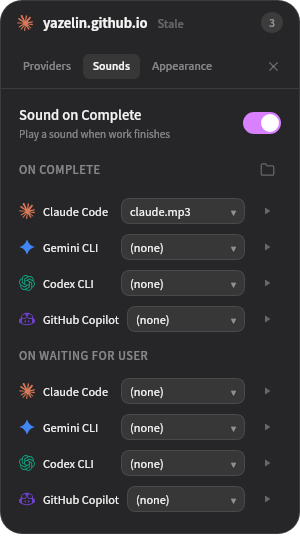
Per-provider audio cues for two events: "task complete" and "waiting for user input". Pick sounds independently for each CLI.

Truly cross-platform

One hook architecture (via a native sidecar binary) works identically across bash, PowerShell, and cmd.exe — no shell-specific quoting hacks.

Light / Dark theme

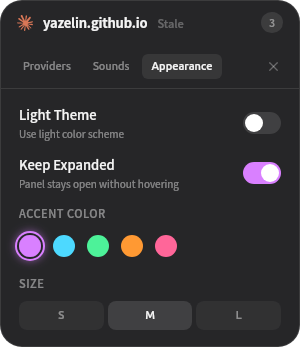
Manual toggle in Settings or Tray. Accent colour picker with five options. Text size S / M / L.

Single instance

Launching a second time focuses the running window instead of spawning a dead tray icon. Auto-detects installed CLIs on first run.

Session states at a glance

The capsule colour + label tell you exactly what each session is doing.

Working
CLI is actively processing — running tools, generating, thinking
Waiting
CLI paused for your input (permission prompt, confirmation)
Idle
Session exists but no activity for 30 s
Stale
No activity for 10 minutes — dims in the list, removed at 30

Every surface, deliberately tiny

Settings live in a compact tabbed sheet. No modal spam, no browser tabs.

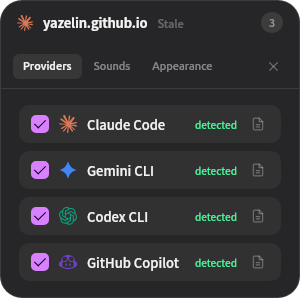
Providers tab

Providers

Toggle each CLI on/off — hooks install or remove immediately. Auto-detection shows which CLIs you already have.

Sounds tab

Sounds

Per-provider dropdowns for both completion and waiting states. Ship your own MP3s; the button opens the sounds directory.

Appearance tab

Appearance

Theme, accent colour, keep-expanded toggle, and text size — everything that tweaks the look is here.

Install

v0.2 ships as zip archives — no installer, no package manager. Download, unzip, run.

Linux Linux

unzip agent-pulse-vX.Y.Z-linux.zip -d agent-pulse
cd agent-pulse
chmod +x agent-pulse agent-pulse-hook
./agent-pulse

Keep agent-pulse and agent-pulse-hook in the same folder — the main app locates the sidecar at its own sibling path.

macOS macOS

Pick the build for your chip: Apple Silicon (-macos-arm64.zip) or Intel (-macos-x64.zip).

unzip agent-pulse-vX.Y.Z-macos-arm64.zip -d agent-pulse
cd agent-pulse
chmod +x agent-pulse agent-pulse-hook
# Strip Gatekeeper's quarantine xattr so the unsigned binary can launch
xattr -cr ./agent-pulse ./agent-pulse-hook
./agent-pulse

Why the xattr step? The binaries aren't signed with an Apple Developer certificate yet, so macOS tags them as quarantined on download and Gatekeeper refuses to launch them ("cannot be opened because the developer cannot be verified"). Removing the xattr tells Gatekeeper to skip that check for these two files. Alternatively, in Finder right-click the binary → Open, then Open again in the warning dialog.

Windows

  1. Download agent-pulse-v0.2.0-windows.zip from the Releases page
  2. Right-click the zip → Extract All → pick any folder
  3. Double-click agent-pulse.exe

SmartScreen may warn on first launch (binaries aren't code-signed). Click More info → Run anyway.

Go to latest release